Perfetto
INFO
Please see the Tracing profilers for more information.
Perfetto is the default tracing system for Android. In fact, its system tracing service has been built into the platform since Android 9.
Build Godot with Perfetto support
First, clone the latest version of the Perfetto source code ("53.0" at the time of writing) using Git:
git clone -b v53.0 --single-branch https://github.com/google/perfetto.gitThis will create a perfetto directory - you can place this anywhere.
Next, build the Android debug or release templates for your architecture using scons (per Compiling for Android), but adding the profiler=perfetto profiler_path=path/to/perfetto arguments with the real path to the perfetto directory.
INFO
It's generally recommended to profile release templates, because that is the version your players will use, and it will perform differently than other types of builds. However, in the case of Android, it can sometimes be useful to use debug templates, because Godot can only do remote debugging of games exported from debug templates.
For example, to build the release templates for arm64:
scons platform=android target=template_release arch=arm64 generate_android_binaries=yes profiler=perfetto profiler_path=path/to/perfettoConfiguration
Perfetto requires a configuration file to tell it which events to track.
Create a file called godot.config inside of the perfetto directory with this content:
# Trace for 10 seconds.
duration_ms: 10000

buffers {
    size_kb: 32768
    fill_policy: RING_BUFFER
}

# Write to file once every second to prevent overflowing the buffer.
write_into_file: true
file_write_period_ms: 1000

# Track events in the "godot" category.
data_sources {
    config {
        name: "track_event"
        track_event_config {
            enabled_categories: "godot"
        }
    }
}
Record a trace
Finally, launch your game on an Android device using the export templates you built earlier.
When you're ready to record a trace (for example, when you've hit the part of your game that is exhibiting performance issues), you can use this script that comes with the Perfetto source code:
cd perfetto
./tools/record_android_trace -c godot.config
This will record for 10 seconds (per the configuration), or until you press Ctrl + C.
Examining the trace
As soon as that script exits, it will launch the Perfetto UI in a web browser.
To see the Godot events, expand the row for your application by clicking on its Android "Unique Name" (Perfetto will also include some events from system services in the trace).
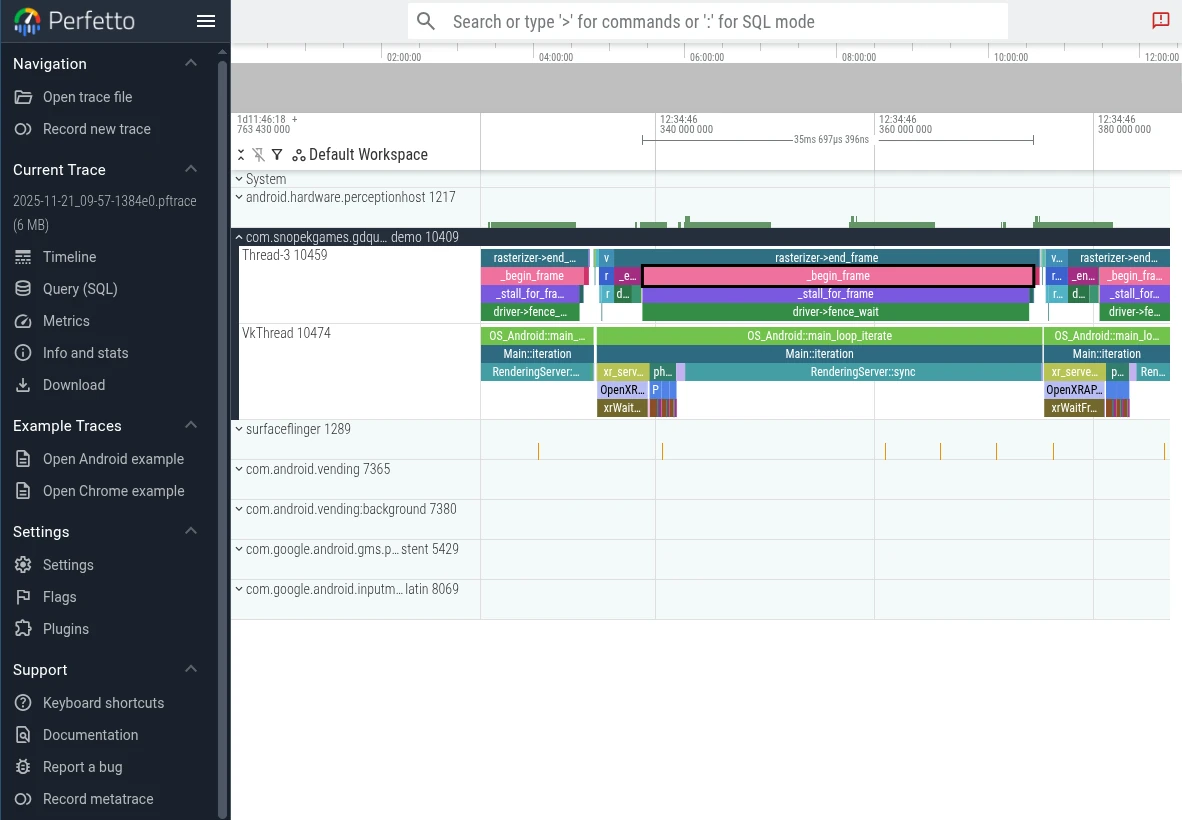
Then you can use the WASD keys to navigate the graph:
Press
AorDto navigate forward or backward along the timelinePress
WorSto zoom in or out
You'll probably need to zoom a bit before you're able to see the individual events from Godot.
To learn more, see the Perfetto UI documentation.